Why I Decided to Build My Own Cube Timer
As someone who has been a “stubborn” Rubik’s cube enthusiast for decades, I’ve tried many timers. However, most existing software feels either visually outdated or clunky when it comes to 3D previews and mobile interaction. I wanted a timer for my PC or tablet that had:
- Industrial Design: Dark mode, high contrast, and a focus on the results.
- High Precision: Every millisecond should be clearly visible.
- WYSIWYG: Not just a text scramble, but a real-time 3D sync of the cube’s state.
More Than Just Timing
🟢 WCA Standard Competition Flow
CubeTimer strictly follows World Cube Association (WCA) standards. It supports the 15-second inspection phase and includes competition-grade penalty logic:
- DNF (Did Not Finish): Mark a failed attempt with one click.
- +2s Penalty: For those slightly messy finishes.
🎨 3D Preview for All Cubes
Using Three.js, I implemented real-time 3D rendering for everything from 2x2 to 7x7, and even the Megaminx. When you see a complex scramble formula, the preview panel shows the exact state of the cube. You can rotate the cube with your mouse or finger to check any face.

🔧 Manual Scramble
This is a small but useful feature. In the preview window, there is a “Manual Scramble” button. You can enter any scramble formula to see the resulting state. This is great for “case studies” or verifying new algorithms.
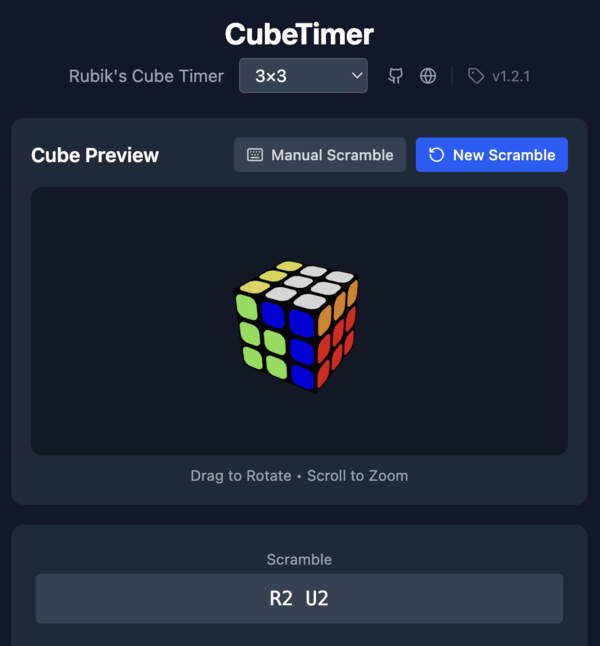
🛡️ “Anti-Mistake” Interaction (Action Pad)
The worst part of using a touchscreen timer is accidentally starting the clock. In CubeTimer v1.2.1, I redesigned the interaction logic:
- Action Pad: Only touching the specific control area starts the timer. Touching the 3D preview or other areas won’t interrupt your session.
- Touch Optimization: single-tap to inspect, long-press to get ready, and release to start.
Technical Challenges
I started trying to build this software with AI assistance two years ago. For two years, I made almost no progress because of strange technical errors.
Clearly, this wasn’t because my poor skills. In the spring of 2026, when I tried again from scratch with the latest Large Language Models, I barely had to write any code. It turns out that my failure to build the app earlier was entirely because AI development was too slow! LOL.
Of course, humans are still needed for the “hard labor”. For example, for the Megaminx 3D modeling, I had to write some mathematical descriptions to help the AI jump out from simple regular cubic cube structures and create a new geometric logic. Also, niche rules like “DNF” and “+2” usually require a few tries before the AI gets them right.
Future Plans & Conclusion
Version 1.2.1 is now quite mature and supports all mainstream cube types. I have been testing it for two months, and the stability is good.
In the future, I plan to add:
- Cloud sync for results.
- Detailed statistics (Ao5/Ao12 trend analysis).
- Career statistics (to track progress over a long period).
- An LLM to predict solve times based on the current scramble.
Feel free to try it out and give me feedback on GitHub!
- Live Demo: https://noinil.github.io/CubeTimer/
- GitHub: https://github.com/noinil/CubeTimer